

Overtime
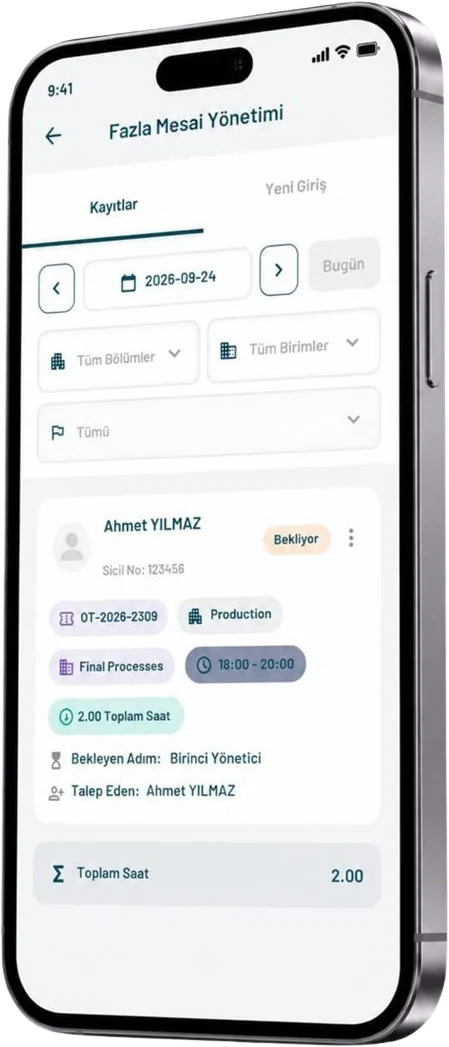
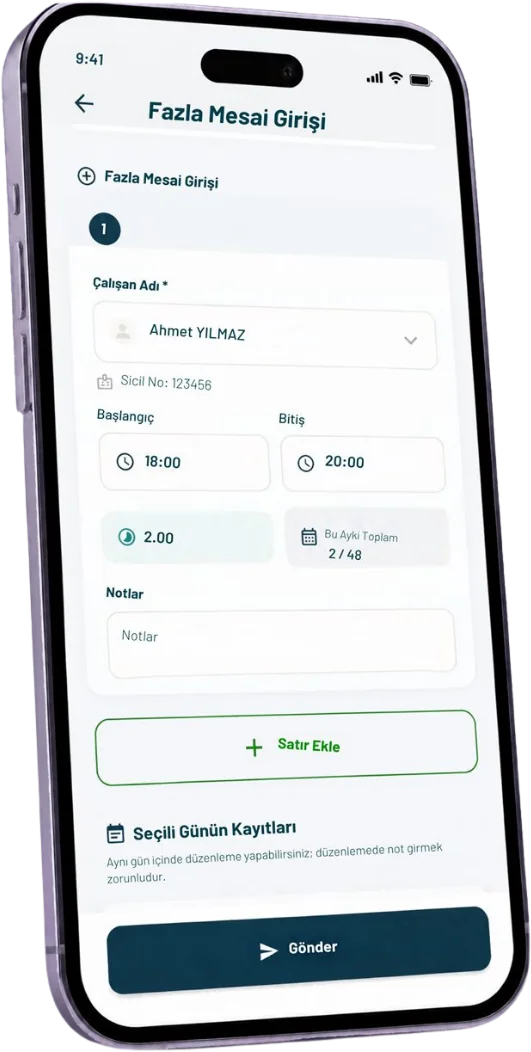
Enter the start and end time and the duration calculates itself. Every request goes through manager approval and is tracked by a record number.
- Automatic duration
- Multi-step approval
- Record number
About the module
Overtime leaves the notebook and joins the approval chain
The Ikago Overtime module calculates each employee’s overtime from the start and end time automatically. No more adding up hours at month end or checking paper forms.
Every request gets a unique record number and goes through the managers’ approval steps. Which step a request is waiting at, who approved it and the total duration are visible on one screen; managers filter records by date, department, unit and status.
Who it is for
For organisations with shift workers, field teams or production staff that want to track overtime through an approval chain.
What changes
- No more manual hour counting
- Every record shows the pending step
- Lists by department and unit
Module features
What can you do with Overtime?
Automatic Duration
Overtime is calculated instantly from the start and end time.
Reason Note
Each request carries a short note explaining why the overtime was needed.
Multi-Step Approval
Requests pass each manager in turn; the pending step shows on the record.
Record Number
Every request gets a unique number for tracking its approval history.
Department and Unit Filters
Managers list records by date, department, unit and status.
Mobile Entry and Tracking
Employees and shift supervisors enter overtime and follow its status on the phone.
How it works
The process in 4 steps
-
1
Entry
The employee enters the date, start and end time and a reason.
-
2
Calculation
The duration is calculated and the request gets a record number.
-
3
Approval
The request passes each manager’s approval in turn.
-
4
Record
Approved overtime stays on record with its total duration.
Mobile app
Enter overtime in the field, approve right away
Overtime is entered and approved in the mobile app. Field teams send their entries from the phone, and managers approve pending requests in the same app.
- Quick entry by picking times
- Pending approval step is visible
- Total hours on every record
Other modules
All Modules →Training
Bring video training and exams together on one platform.
Explore →Leave Management
Employees request leave on the web or mobile, the request moves through approval steps, and the remaining balance is always visible.
Explore →Payroll Management
Monthly payslips are prepared per employee.
Explore →Suggestions & Complaints
Employees send requests, suggestions and complaints by name or anonymously.
Explore →See the Overtime module with your team.
In a short meeting, we'll show how the module fits your processes.